TUM IT Security Incident: What Happened and Key Lessons
A credential theft at the myTUM portal escalated into a breach of TUMonline after attackers used a system administrator’s login. This post covers what happened, which data was exposed, how TUM responded, and the security lessons for universities and enterprises.
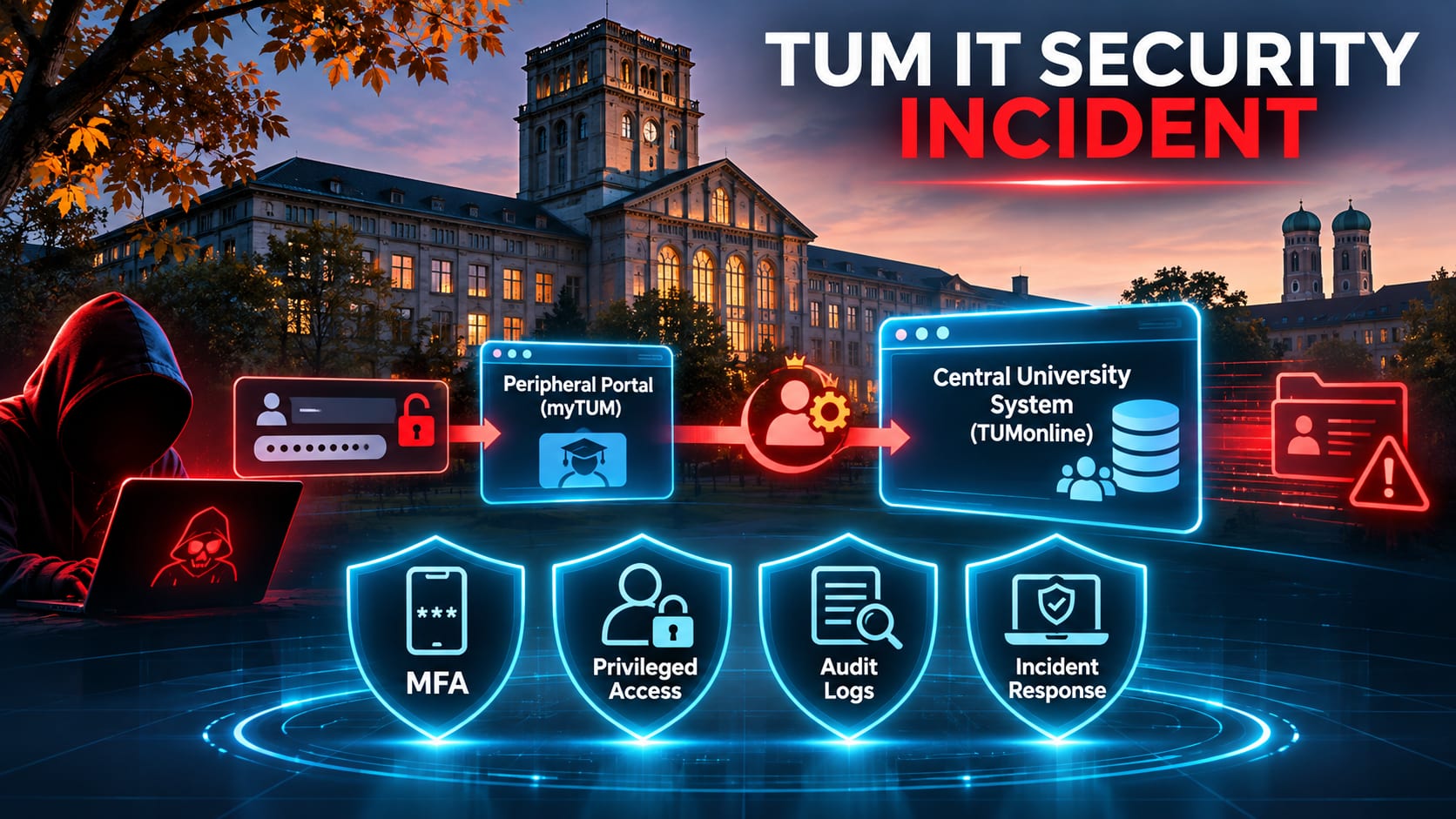
Key takeaways
- Attackers compromised the myTUM portal and stole the central login passwords of every user registered with it.
- A stolen TUMonline system administrator credential let the attackers move from a peripheral portal into the core campus management system.
- Exposed data includes passwords, names, home addresses and dates of birth, plus role-specific data for employees and students. Grades and applications are currently not believed to be affected.
- Accounts protected by multi-factor authentication were not compromised, which makes MFA the single most effective control in this incident.
- Privileged accounts need separate credentials, PAM controls and phishing-resistant MFA rather than relying on everyday SSO logins.
- Thorough logging allowed TUM to bound the scope of the breach quickly, which supports both incident response and GDPR notification.
- Affected users should expect targeted phishing, vishing and postal fraud that uses their exposed personal details.
On this page
- What Happened at TUM
- What Data Is Affected
- TUM’s Response
- Key Security Lessons from the TUM IT Security Incident
- 1. MFA was the decisive control
- 2. Privileged access needs its own safeguards
- 3. Peripheral portals are part of the attack surface
- 4. Logging limited the damage assessment
- 5. Expect follow-on social engineering
- Recommended Actions for Affected Users
- Conclusion
The TUM IT security incident, disclosed by the Technical University of Munich on 6 November 2026, may affect the personal data of its students and employees. It is a clear example of how one compromised credential store can grow into a breach of a core business system, and of how a single control could have stopped it.
What Happened at TUM
Unknown attackers compromised the myTUM portal and obtained the central TUM login passwords of every user registered with that portal. These credentials give access to TUM’s single sign-on systems, including login.tum.de and TUMonline.
The stolen credentials included those of a TUMonline system administrator. The attackers used that privileged account to attack TUMonline, the university’s central campus management system. TUM then took TUMonline offline.
What Data Is Affected
According to TUM, the following data may have been exposed:
All affected individuals: TUM account password, name, home address and date of birth.
Employees: work address and work phone number.
Students: student ID number, degree program and number of completed semesters, where applicable.
TUM states that the attackers’ activity in TUMonline was largely logged. Based on that log analysis, it currently believes that other data, such as grades and applications, was not accessed. The investigation is ongoing.
TUM’s Response
In response to the breach, the university suspended the affected accounts, temporarily deactivated TUMonline and reports that further spread of the attack was contained. It has notified the Bavarian State Commissioner for Data Protection and filed a criminal complaint. Affected users will receive password-reset options and deadlines, with guidance to be published on the TUM IT news page.
Key Security Lessons from the TUM IT Security Incident
1. MFA was the decisive control
TUM confirmed that accounts protected by multi-factor authentication were not compromised. Phishing-resistant MFA should be mandatory for every account, and especially for privileged ones.
2. Privileged access needs its own safeguards
The administrator’s everyday SSO credentials were enough to reach a critical system. Administrative access should use separate, dedicated accounts, privileged access management (PAM), just-in-time elevation and, where feasible, isolated administrative workstations.
3. Peripheral portals are part of the attack surface
A secondary portal became the source of credentials for the entire identity ecosystem. Every application that handles central credentials needs the same security testing, hardening and monitoring as the identity provider itself.
4. Logging limited the damage assessment
Because access was largely logged, TUM could quickly bound the scope of exposure. Complete, tamper-resistant audit logging is essential for incident response and regulatory notification under GDPR.
5. Expect follow-on social engineering
Names, addresses, degree programs and birth dates are ideal material for convincing phishing, vishing and postal fraud.
Recommended Actions for Affected Users
Change your TUM password as soon as the reset options are available, then enable MFA.
Change the password on any other service where you reused your TUM password, and use unique passwords from now on, ideally with a password manager.
Treat unexpected emails, calls and letters that reference your TUM details with suspicion. TUM will never ask for your password by email, phone or letter.
Report suspicious messages to TUM’s IT security team.
Conclusion
The TUM IT security incident shows how quickly credential compromise escalates when privileged accounts lack strong authentication. Universities and enterprises alike should treat MFA enforcement, privileged access separation and identity-centric monitoring as baseline controls.
Questions and answers
What happened at TUM?
Unknown attackers compromised the myTUM portal and stole central TUM login passwords. They then used a TUMonline system administrator’s credentials to attack TUMonline, which TUM took offline.
When was the incident disclosed?
TUM published its disclosure on 6 November 2026 and is updating the press release as the investigation continues.
Who is affected?
Students and employees who had registered with the myTUM portal are affected, because their central TUM login credentials were stolen.
What personal data may have been exposed?
For all affected individuals: password, name, home address and date of birth. Employees may additionally have had their work address and work phone number exposed. Students may additionally have had their student ID number, degree program and number of completed semesters exposed.
Were grades or applications compromised?
Based on its analysis of access logs, TUM currently believes no other TUMonline data, such as grades or applications, was accessed. The investigation is still ongoing.
How did TUM respond?
TUM suspended the affected accounts, temporarily shut down TUMonline, contained the spread of the attack, notified the Bavarian State Commissioner for Data Protection and filed a criminal complaint.
What should affected users do now?
Change the TUM password once the reset options are available, enable MFA, change the password on any other service where it was reused, and stay alert to suspicious emails, calls and letters.
Did multi-factor authentication help?
Yes. TUM confirmed that accounts with MFA enabled were protected from this attack.
Will TUM ask for my password by email or phone?
No. TUM has stated it will never request passwords by email, phone or letter. Any such request should be treated as fraudulent and reported to TUM’s IT security team.
What is the main lesson for organizations?
A single compromised credential store can expose an entire identity ecosystem. Organizations should enforce phishing-resistant MFA, separate privileged accounts from everyday ones, apply PAM and just-in-time access, harden every application that handles central credentials, and maintain complete audit logging.
How does this relate to GDPR?
The breach involves personal data of EU residents, so TUM must notify the competent supervisory authority and inform affected individuals. TUM has reported the incident to the Bavarian State Commissioner for Data Protection.
Where can I find official updates?
TUM’s press release page carries the latest status, and password-reset instructions will be published on the TUM IT news page at https://www.it.tum.de/en/it/news-1/.
Sources
Stay Ahead with the Latest Insights
Subscribe to my newsletter for the latest insights on cybersecurity, technology, application security, and practical tips.
Discussion